
Developing a 2D Sandbox Tile Manager
Introduction
One of the most important systems of a 2D sandbox game is the tile management. This system determines how the player interacts with the world around them, and how they make their world their own. Tile management is fairly simple to get running, but gets complex when considering performance. In our final build of Wizbowo's Conquest, our tile manager had the following capabilities:
- Asynchronous Tile Rendering
- Live Updating
- Liquid Rendering
- Lighting System
Tile Layout
Wizbowo's Conquest follows a similar world size structure to Terraria. This means that small worlds are 4200x1200 tiles, medium worlds are 6400x1800, and large worlds are 8400x2400. In order to store this data, we need an efficient structure that handles memory as efficiently as possible. Terraria uses a single struct approach to keep data packed tightly:
C# - Terraria Tile Layout
public class Tile {
    public ushort type;
    public ushort wall;
    public byte liquid;
    public short sTileHeader;
    public byte bTileHeader;
    public byte bTileHeader2;
    public byte bTileHeader3;
    public short frameX;
    public short frameY;
    ...
}
The exact layout of struct is out of the scope of the blog post, but the primary idea is that everything that the game needs to handle tiles (block id, wall id, slope variant, liquid type, etc.) is stored in 1 place. Godot doesn't have an equal equivalent to structs, so we have to take a different approach:
GDScript - Wizbowo's Conquest Tile Layout
# These are interpreted as 16-bit integers
var blocks      := PackedByteArray()
var walls       := PackedByteArray()

# These are interpreted as 8-bit integers
var liquid      := PackedByteArray()
var liquid_type := PackedByteArray()
...
This approach keeps the tightly-packed format, but has each tile property in its own array instead of packed into a single tile struct. In terms of memory usage, these approaches are largely comparable (although we favored a full liquid_type array for simplicity).
Performance Implication:
Terraria's approach will theoretically perform better in most cases (where multiple tile properties are accessed at once). This is because Terraria's data is interleaved, meaning there are typically less cache misses per tile access. This is simply a limitation with Godot (without modification).
Asynchronous Tile Rendering
We are using Godot's TileMapLayer node for tile collision and rendering to keep things simple. This does come with a large downside, however: we cannot finely control the rendering system. Because of this, we had to implement a few workarounds in order to keep performance up. One important optimization is that chunks are logically (but not physically) separated into 16x16 tile chunks. The first step we need to handle is actually placing the tiles.
Auto-Tiling
Wizbowo's Conquest follows a minimal 47-tile connection system for auto-tiling. This means that blocks will adjust their sprites based on their neighbors. Below is the exact template we use:
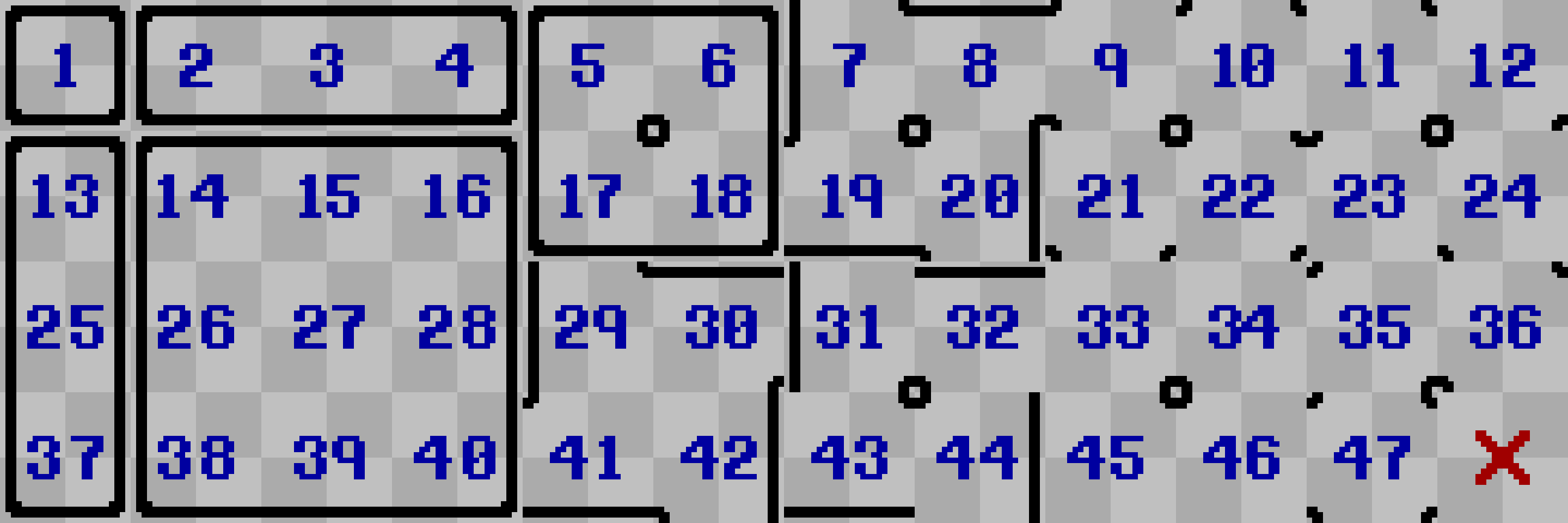
Determining what tile to select from this grid happens in two steps:
- Calculate whether or not cardinal neighbors exist (Up, Down, Left, Right)
- For each diagonal neighbor that exists, only include them if their two cardinal neighbors (that are also in the center's range) also exist
The second rule gives us a subset of the full 255-tile set that requires just 47 tiles. This is typically enough for most games (and requires a lot less work), so it's what we chose for Wizbowo's Conquest. In practice, the auto-tile calculation looks like this:
GDScript - Auto-Tile Calculation
# store tiles in a bitmask format
value = 0b00000000

# cardinal neighbors
if is_solid[prev_blocks[x]]:
    value += 1
if is_solid[curr_blocks[x - 1]]:
    value += 2
if is_solid[curr_blocks[x + 1]]:
    value += 4
if is_solid[next_blocks[x]]:
    value += 8

# diagonal neighbors
if value & 1 and value & 2 and is_solid[prev_blocks[x - 1]]:
    value += 16
if value & 1 and value & 4 and is_solid[prev_blocks[x + 1]]:
    value += 32
if value & 8 and value & 2 and is_solid[next_blocks[x - 1]]:
    value += 64
if value & 8 and value & 4 and is_solid[next_blocks[x + 1]]:
    value += 128
Auto-tiling is performed whenever a new chunk is sent to client. An optimization here would be to simply cache the auto-tiling results for each tile instead of calculating it whenever we render a new chunk. Our current setup has the auto-tiling calculation taking up around half the frame time, with the other half going to updating the tilemap. This means that this optimization could theoretically double the number of chunks we can render, although it would increase memory requirements and network throughput.
Update Queue
Speaking of rendering time, in order to keep gameplay smooth, we limit the number of chunks we update in a single frame. Instead of having a hard count, we limit based on current update time. For Wizbowo's Conquest, we found 4 milliseconds to be an reasonable value:
GDScript - Chunk Update Queue
# store the start time
var start := Time.get_ticks_usec()

for chunk in chunks:
    # only updated dirty chunks
    if chunk_states.get(chunk, UpdateState.UNLOADED) == UpdateState.DIRTY:
        # calculates auto-tiling and sets tiles
        autotile_region(
            chunk.x * TileManager.CHUNK_SIZE - 1,
            chunk.y * TileManager.CHUNK_SIZE - 1,
            TileManager.CHUNK_SIZE + 2,
            TileManager.CHUNK_SIZE + 2
        )

        # remove chunk from queue
        queued_chunks.erase(chunk)

        # only process for up to 4ms
        if Time.get_ticks_usec() - start >= 4000:
            break
Live Updating
Since Wizbowo's Conquest is a real-time multiplayer game, we need to synchronize tile updates whenever blocks are placed and destroyed. Instead of running the full, expensive auto-tiling system each frame, we can just update the 3x3 range around the block that was modified. More mature tile management systems might batch these updates, but for Wizbowo's Conquest, we just updated tiles immediately when they changed.
GDScript - Single-Tile Updates
func update_tile(x: int, y: int) -> void:
    # get tile maps
    var blocks: TileMapLayer = $'blocks'
    var walls: TileMapLayer = $'walls'

    var block := TileManager.get_block_unsafe(x, y)
    var wall := TileManager.get_wall_unsafe(x, y)

    # set blocks
    if block == 0:
        blocks.erase_cell(Vector2i(x, y))
    else:
        blocks.set_cell(Vector2i(x, y), block, Vector2i(2, 2))

    # set walls
    if wall == 0:
        walls.erase_cell(Vector2i(x, y))
    else:
        walls.set_cell(Vector2i(x, y), wall, Vector2i(2, 2))

    # auto-tile neighbors
    autotile_region(x - 1, y - 1, 3, 3)
In this snippet, the set blocks/walls sections are part of an old approach we attempted. Instead of having sections of the world have no tiles while loading, we originally set them to placeholders (the tile at (2, 2) is the "center fill" tile). We found this to be more visually jarring in practice, so we removed it from the bulk of the auto-tiling logic. It's still in this snippet since the flicker it caused was unnoticeable.
Liquid Rendering
Most of the tiles in Wizbowo's Conquest are rendering using Godot's TileMapLayer node. However, these can be cumbersome for large updates (hence why we had to limit the allowed processing time). Additionally, they are not thread-safe (in fact, no scene tree changes are allowed on other threads). To get around this, we used a shader-based approach for the two liquid types we have: water and lava.
GLSL - Water Shader
void vertex() {
	world_position = (MODEL_MATRIX * vec4(VERTEX, 0.0, 1.0)).xy;
}

void fragment() {
	vec2 tile_position = world_position / 8.0 - water_offset;
	vec2 local_position = vec2(mod(world_position.x, 8.0), mod(world_position.y, 8.0));

	vec2 tex_size = vec2(textureSize(water_texture, 0));

	// Get water level from red channel
	float water_level = texture(water_texture, tile_position / tex_size).r;
	float local_level = (8.0 - local_position.y) / 8.0;

	// Make sure at least 1 pixel of water is rendered (if water exists)
	water_level = step(0.001, water_level) * max(water_level, 0.125);

	// Set base color
	COLOR = water_color;

	// Only color up to water level
	COLOR.a *= step(local_level, water_level);
}
This shader also handles drawing foam along the edges of each tile as collapsing columns into a single continuous stream rather than stacked low-level blocks. This has been omitted to conserve space, the full file is located here: Wizbowo's Conquest GitHub
This shader is placed in the player scene and renders on top of the player, but below the tiles. The vertex function transforms the UVs from local space to world space, allowing us to access the water texture per-tile. Speaking of the water texture, it's a 176x112 texture that represents the current water level relative to the top-leftmost chunk visble on the screen. This means that no matter where the player is, they shouldn't see any seams in the water rendering. The image generation is also threaded, so it doesn't slow down the main process:
GDScript - Water Texture Generation
func _rebuild_liquid_texture_internal(origin: Vector2i) -> void:
	water_data = PackedByteArray()
	water_data.resize(WATER_WIDTH * WATER_HEIGHT)
	lava_data = PackedByteArray()
	lava_data.resize(WATER_WIDTH * WATER_HEIGHT)

	var index := 0

	# rebuild texture
	for y in range(WATER_HEIGHT):
		var row := (origin.y + y) * world_width

		for x in range(WATER_WIDTH):
			if origin.y + y < world_height and origin.x + x < world_width:
				var type := liquid_type[row + origin.x + x]

				if type == WaterUpdater.WATER_TYPE:
					water_data[index] = liquid[row + origin.x + x]
				elif type == WaterUpdater.LAVA_TYPE:
					lava_data[index] = liquid[row + origin.x + x]

			index += 1

	_update_liquid_texture_internal.call_deferred(origin)
Lighting System
Terraria's rendering system adds the tile light directly to the tile rendering. For the same reasons as the liquid renderer, we did not use a TileMapLayer node (tile map overhead + lack of threading support). If we had a lower-level implementation, we could just add the current tile light to the current tile being rendered, but the image-based approach ended up working surprisingly well.
GLSL - Light Renderer
shader_type canvas_item;
render_mode blend_mul;

// --- Uniforms --- //
global uniform sampler2D light_texture: filter_linear;
global uniform sampler2D sky_texture: filter_linear;
global uniform vec2 light_offset;
global uniform float current_time;

uniform sampler2D sky_gradient;

varying vec2 world_position;

uniform sampler2D light_viewport;

// --- Functions --- //
void vertex() {
	world_position = (MODEL_MATRIX * vec4(VERTEX, 0.0, 1.0)).xy;
}

void fragment() {
	vec2 tile_position = world_position / 8.0 - light_offset;
	vec2 local_position = vec2(mod(world_position.x, 8.0), mod(world_position.y, 8.0));

	vec2 tex_size = vec2(textureSize(light_texture, 0));
	vec4 sky_color = texture(sky_gradient, vec2(current_time, 0.0));

	vec4 color = texture(light_texture, tile_position / tex_size) +
		texture(light_viewport, UV) +
		sky_color * texture(sky_texture, tile_position / tex_size).r;

	COLOR *= color;
}
Similar to the liquid renderer, the lighting is attached to the player scene. However, since we want the light to determine the brightness of the scene, we need to set the render_mode to blend_mul instead of the default blend_mix mode. This multiplies the current screen pixels by the rendered light pixel, meaning full white pixels remain the same while colored/black pixel are obscurred.
Conclusion
Overall, given the limitations we had with our high-level Godot approach, we are very happy with how the tile management system turned out. It works well enough to have smooth gameplay during normal conditions, and we believe it was optimized as much as it could be given that we had to build the entirety of Wizbowo's Conquest over the course of 1 semester.